
Price Unit Labels - Per Kg, Per Litre & Per Piece Prices on Products, Listings and Cart images
Price Unit Labels - Per Kg, Per Litre & Per Piece Prices on Products, Listings and Cart
Price:
€49.99
No tax
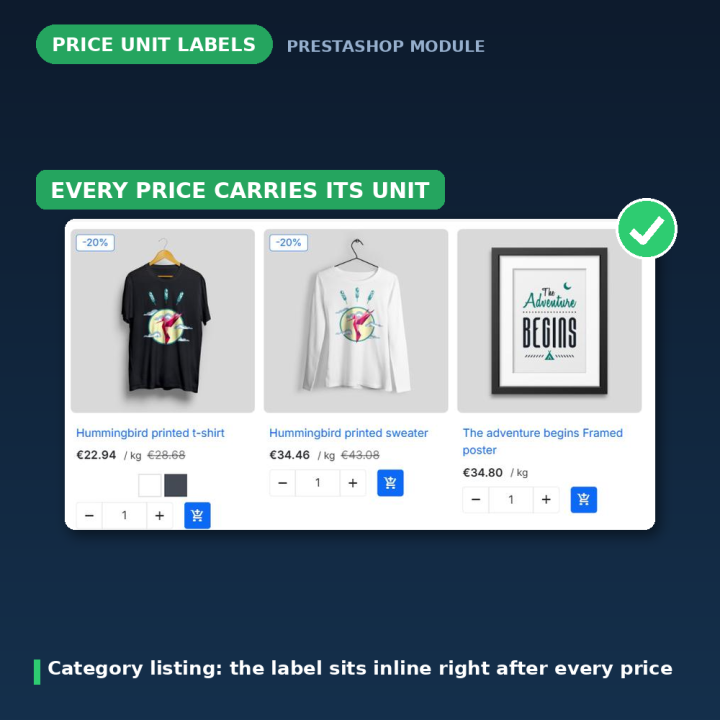
Sell by weight, volume, length or piece? Add a small unit label — " / kg", "per litre", "per box" — right next to every price, on the product page, category listings, search results, quick view and the cart. Set one default label for the whole shop, or a different label per product, per combination and per language. HTML allowed, CSV bulk edit included, and no JavaScript patching: the label is rendered by your theme's own price block. For PrestaShop 1.7 – 9.
A price without its unit is only half a price
"€42.00" tells a customer almost nothing when you sell fabric, cheese, tiles, paint or cable. "€42.00 / kg" tells them everything. This module puts that missing unit next to the price everywhere your theme prints one — and it does it without you editing a single template.
How it works
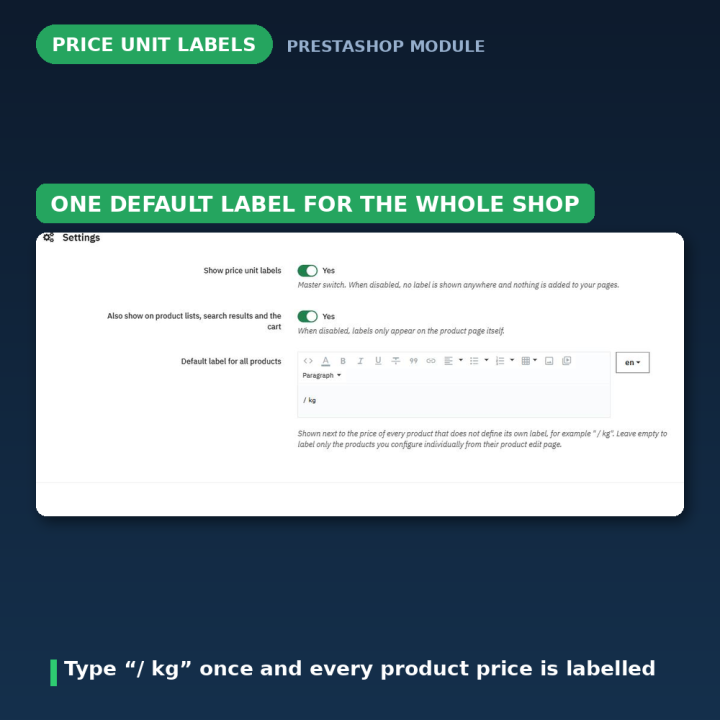
- 1. Switch it on and type a default — one field, for example
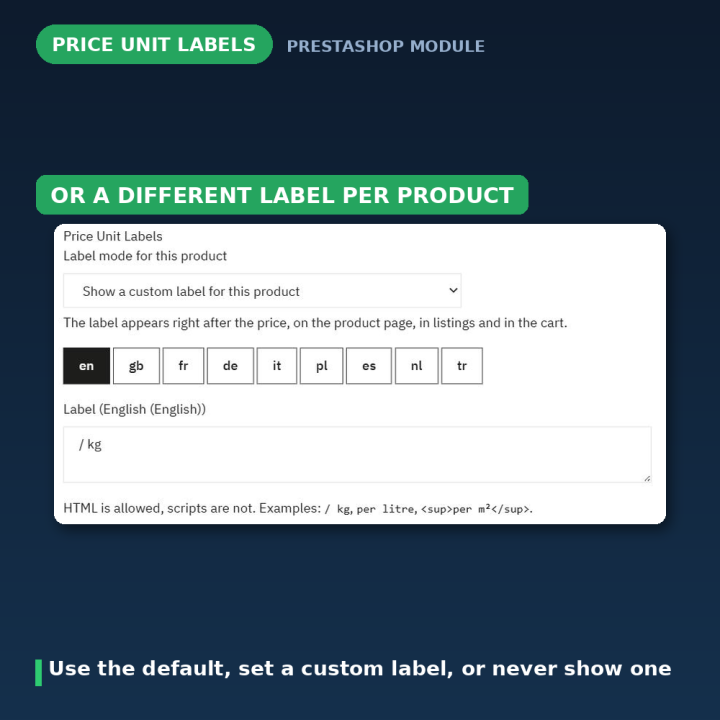
/ kg, and every price in the shop is labelled from that second on. For a butcher, a fabric shop or a tile shop that is the whole setup. - 2. Override where you need to — any product can carry its own label, or be told never to show one, from a panel on its product edit page.
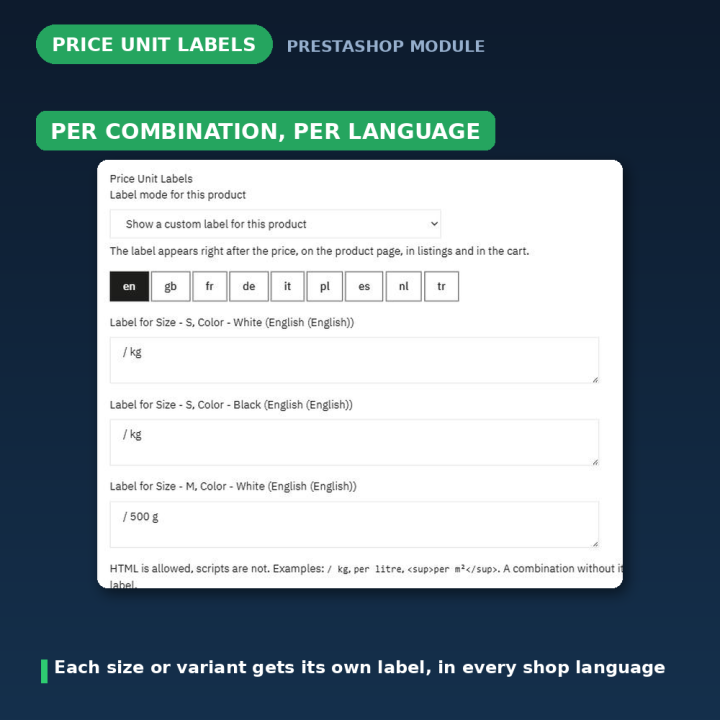
- 3. Go per combination if you sell in sizes — products with combinations get one label field per combination, so the 250 g jar and the 1 kg tub read differently, and the label changes as the visitor picks another combination.
Everywhere the price is, the label follows
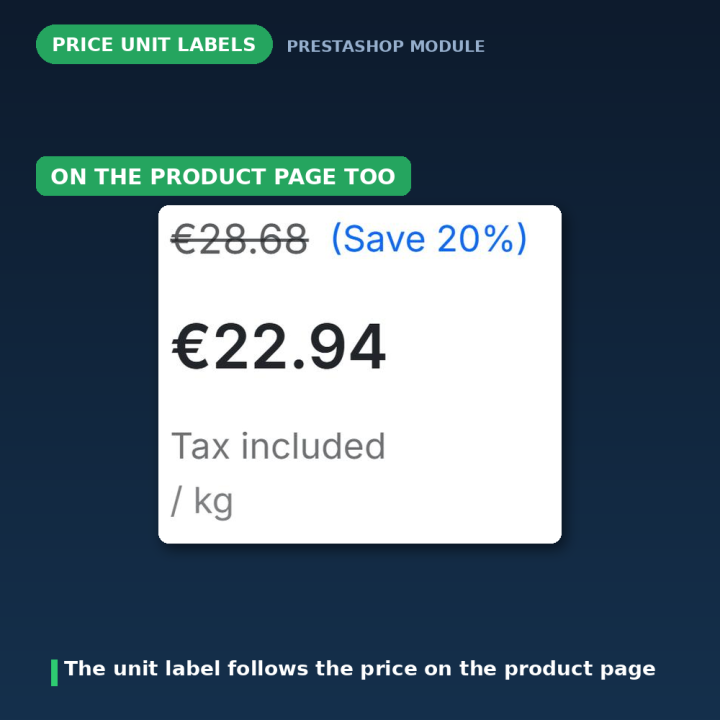
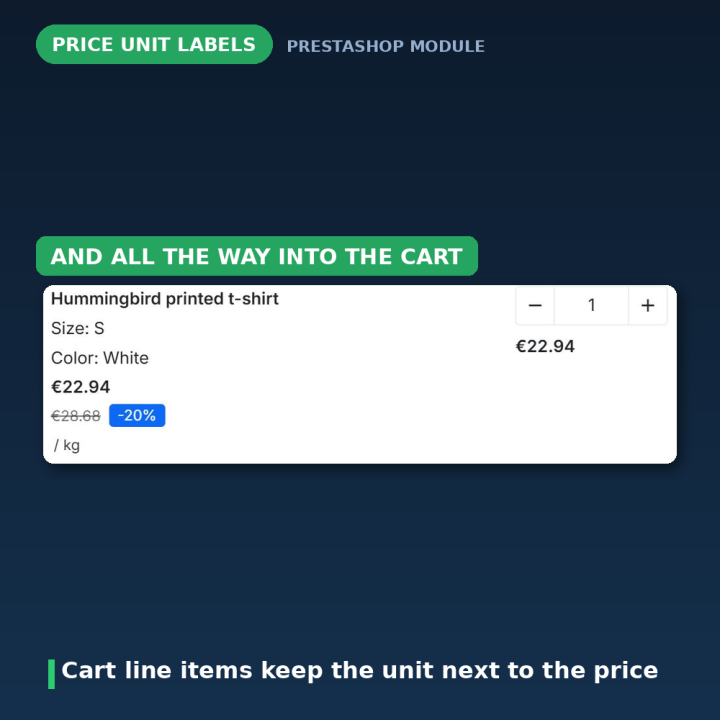
Product page, category and listing pages, search results, quick view, related-product sliders and the cart. On the product page the label is appended inside every price line — the current price, the struck-through regular price and the pack "Instead of" price — so €42.00 / kg always reads as one unit. One switch keeps labels on the product page only, if that is what you want.
Three modes per product
Use the default label is the normal case — the product simply inherits what you typed in the settings. Show a custom label gives that product its own wording, per language and per combination. Never show a label silences it for that product, even when a shop-wide default exists — useful for the one item in your catalogue that is not sold by unit.
Multilingual, and HTML if you want it
Every label is entered per shop language, so your German customers read "je kg" while your French ones read "le kilo". Labels accept HTML — <sup>, <small>, a styled <span> — and any script or event handler is stripped automatically when the label is saved or imported.
CSV bulk edit for large catalogues
Export every label to a semicolon-separated CSV, edit it in a spreadsheet, import it back. Each line carries the label, product ID, combination ID, shop ID, language ID and whether the label is shown. Invalid lines are reported with their line number and reason instead of failing silently, an empty label removes that row, and importing the same file twice is safe.
Rebuilt without the JavaScript
Version 1.x loaded jQuery from a CDN and patched prices in the browser, one AJAX request per product on category pages. Version 2.x renders server-side through PrestaShop's standard displayProductPriceBlock hook — no jQuery, no AJAX, no theme modification, no two-second delay when switching combinations. A tiny dependency-free fallback script runs on product pages only, for heavily customised themes whose price block skips the standard hooks; without it the label simply sits on the line below the price.
Compatibility
PrestaShop 1.7, 8 and 9. Because the label is rendered by the theme's own price block, it inherits your styling; .pricetext-label is there if you want to restyle it from your theme's CSS. Labels of deleted products are cleaned up automatically, and all back-office actions are token-protected.
Frequently asked questions
Do I have to label every product one by one?
No. Type one default label in the settings and every product price gets it immediately. Per-product labels are only for the exceptions.
Can different sizes of the same product show different labels?
Yes. Products with combinations get one label field per combination, and the label updates natively when the visitor picks another combination.
Can I show the label on the product page only?
Yes — one switch turns off labels in listings, search results and the cart while keeping them on the product page.
Does it work in all my shop languages?
Yes. Every label, default or per-product, is entered per language.
Can I put HTML in a label?
Yes — small tags, superscripts and styled spans all work. Scripts and event handlers are removed automatically when the label is saved or imported.
How do I edit hundreds of labels at once?
Export them to CSV, edit the file in a spreadsheet and import it back. Lines that cannot be applied are listed with their line number and the reason.
What happens if I uninstall?
The module's tables and all stored labels are dropped. Export to CSV first if you may want them back.
-
ReferenceUNITPRICEDISPLAY
-
CompatibilityPrestashop 1.7
Prestashop 8
Prestashop 9 -
Available Module TranslationsDutch
English
French
German
Italian
Polish
Portuguese
Spanish
Turkish
Compatibility
PS1.7
PS8
PS9
Translations
 Dutch
Dutch
 English
 French
 German
 Italian
 Polish
 Spanish
 Turkish
Developer
 MEG Venture
4 other products in the same category
- New

Pet Food Calculator - Daily Portions, Budget & BARF Planner Module
€49.99
Rated out of 5 stars based on
review(s)
| Version | 2.0.1 |
|---|---|
| Last updated | 2026-07-28 |
| Changelog | - [2026-07-24] Add Dutch, Polish, and Turkish translations for price unit labels in the pricetext module - [2026-07-23] Bump version to 2.0.1 and update changelog to fix upgrade issue that could disable the module on some shops - [2026-07-23] Translate price unit labels module to Turkish, updating all relevant strings for better localization and user experience. - [2026-07-23] Translate settings messages to English in multiple language files for price unit labels module - [2026-07-23] Populate translation files with complete translatable strings - [2026-07-23] Populate translation files with complete translatable strings - [2026-07-23] Populate translation files with complete translatable strings - [2026-07-23] Populate translation files with complete translatable strings - [2026-07-23] Populate translation files with complete translatable strings - [2026-07-23] Populate translation files with complete translatable strings - [2026-07-23] Add missing translation files (fr, de, pl, nl, tr, it, es) - [2026-07-13] Enhance label placement on product pages and improve JavaScript fallback functionality - [2026-07-13] Add JavaScript fallback for product labels and enhance README documentation - [2026-07-13] Add PriceText module files and installation scripts - [2025-04-29] Attribute based price listing feature is added to the module. - [2025-02-10] v1.1.0 - [2025-02-05] v1.1.0 - [2023-09-06] v1.0.0 initial release - [2023-09-06] Initial commit |
↻ Version history (2)
• [2026-07-13] Enhance label placement on product pages and improve JavaScript fallback functionality
• [2026-07-13] Add JavaScript fallback for product labels and enhance README documentation
• [2026-07-13] Add PriceText module files and installation scripts
• [2025-04-29] Attribute based price listing feature is added to the module.
• [2025-02-10] v1.1.0
• [2025-02-05] v1.1.0
• [2023-09-06] v1.0.0 initial release
• [2023-09-06] Initial commit
• [2026-07-13] Add JavaScript fallback for product labels and enhance README documentation
• [2026-07-13] Add PriceText module files and installation scripts
• [2025-04-29] Attribute based price listing feature is added to the module.
• [2025-02-10] v1.1.0
• [2025-02-05] v1.1.0
• [2023-09-06] v1.0.0 initial release
• [2023-09-06] Initial commit
Comments (0)
Your review appreciation cannot be sent
Report comment
Report sent
Your report cannot be sent