

Price by Surface, Volume, Length, Perimeter & Weight - Dimensional Pricing Calculator images
Price by Surface, Volume, Length, Perimeter & Weight - Dimensional Pricing Calculator
Price:
€59.99
No tax
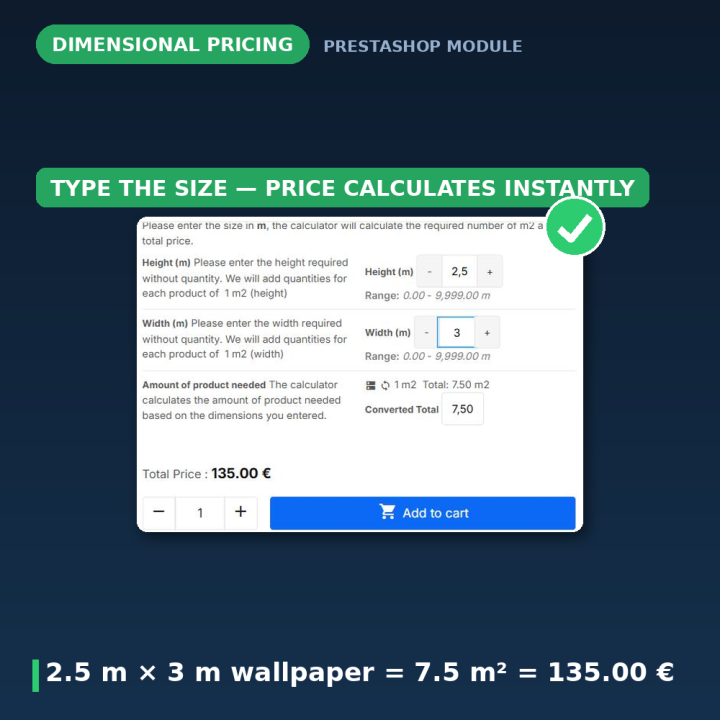
Sell products the way they are actually measured. Your customer enters the dimensions on the product page — width, length, height or weight — and the module calculates the quantity and price instantly. Perfect for wallpaper, flooring, fabric, blinds, timber, cables, liquids and food sold by weight. Steps and rounding, min/max limits, waste allowance, extra fees, per-combination overrides and CSV mass updates included. For PrestaShop 1.6 – 9.
Sell by the measure, not by the piece
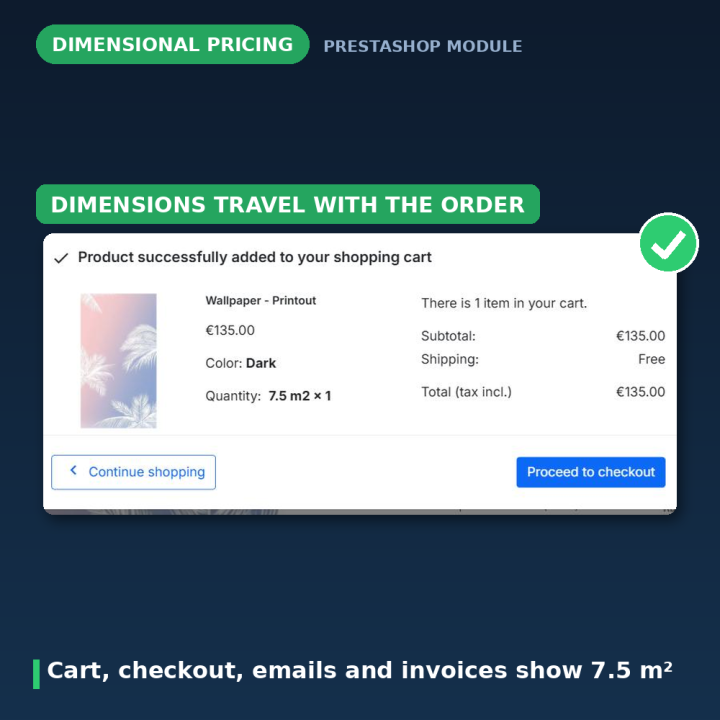
Flooring is sold by the square metre, fabric by the metre, paint by the litre, cheese by the kilogram — but a standard PrestaShop product only understands "pieces". This module closes that gap: the customer types in the dimensions they need, and the price updates instantly. The entered dimensions travel with the order all the way to the invoice, so your warehouse always knows exactly what to cut, pour or weigh.
How it works
- 1. Pick a calculation mode per product — length (linear), perimeter, surface (area), volume or weight, with your own units, steps and limits.
- 2. The customer enters dimensions — in one of two product-page layouts (stacked fields or a multiplication view), with tooltips and images to guide them.
- 3. Price and quantity are calculated live — and carried through the cart, checkout, order details, emails and invoices.
Five calculation modes
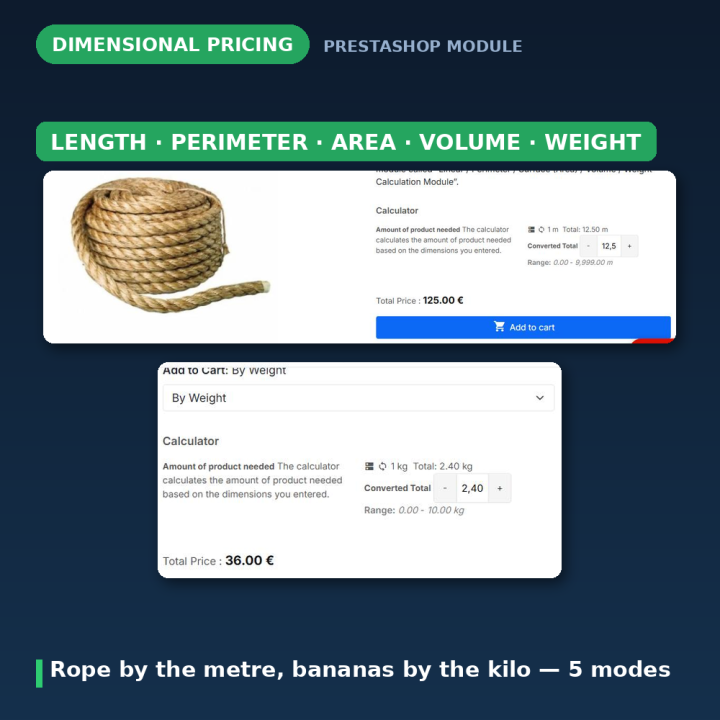
- Length (linear) — cables, ropes, timber profiles, skirting boards, chains sold by the metre.
- Perimeter — frames, edging, fencing calculated from the outline of a shape.
- Surface (area) — wallpaper, flooring, tiles, glass, banners and blinds priced per m².
- Volume — liquids, concrete, soil, packaging and boxes priced per m³ or litre.
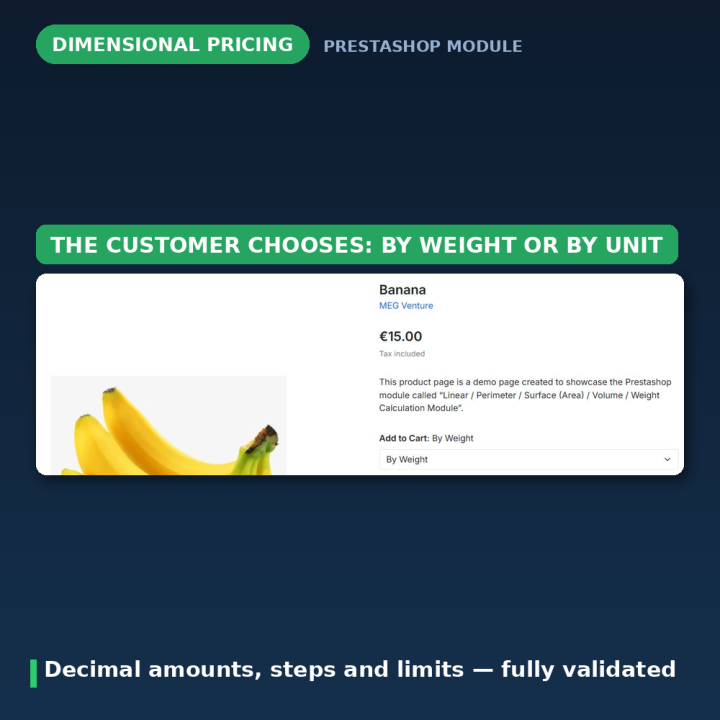
- Weight — food, produce, hardware and bulk goods priced per kilogram, with decimal amounts.
Built for real shops
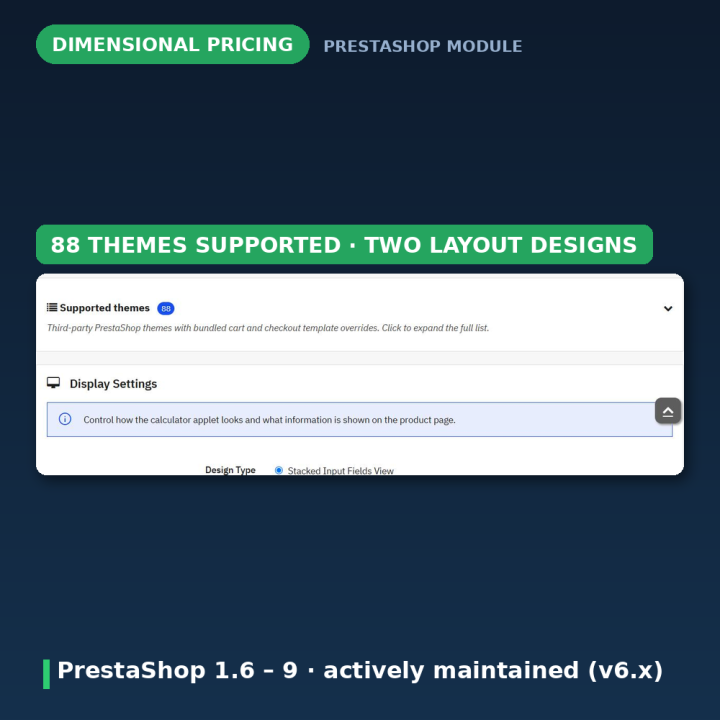
- Two product-page designs: stacked dimension fields or a clear "width × length" multiplication view.
- Steps and rounding (for example only multiples of 0.5 m), minimum and maximum limits per dimension.
- Waste allowance percentage — automatically add cutting loss to the calculated quantity.
- Conversion ratio between the entered dimensions and the stocked unit.
- Starting price, minimum order price, and an optional extra fee whose checkbox label always shows the current amount.
- Per-combination overrides: different steps and limits for each product variant.
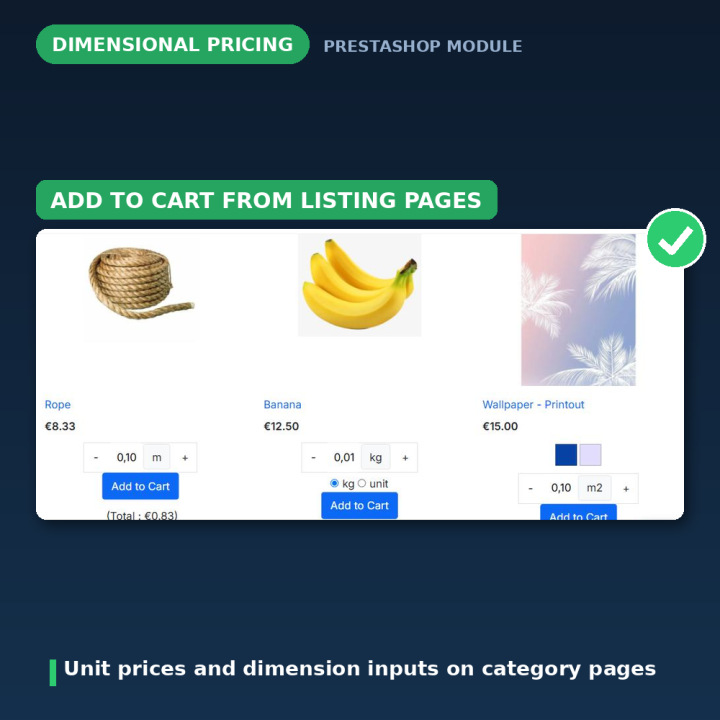
- Unit price display, decimal quantities, and configurable cart aggregation (merge identical dimensions or keep each cut as its own line).
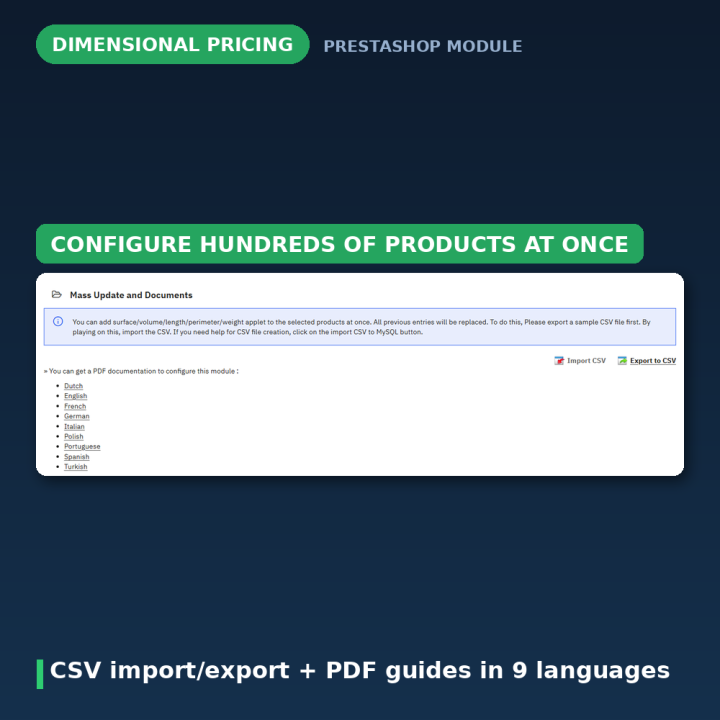
- CSV import and export for mass-updating dimensional settings across your catalog.
- Multi-currency, multistore-aware, webservice/API friendly, and built on PrestaShop's native customization mechanism — no core hacks.
Compatibility and maintenance
Works on PrestaShop 1.6, 1.7, 8 and 9. Actively maintained (version 6.x) with a detailed public changelog — every fix documented, including the exact root cause. Fully translated into 8 languages (English, German, Spanish, French, Italian, Dutch, Polish, Turkish), with partial translations for 13 more.
Frequently asked questions
Which shops is this module for?
Any shop that sells by dimension: wallpaper, flooring, tiles, fabric, curtains and blinds, timber, cables and ropes, glass, banners and signage, paint and liquids, food by weight, packaging by volume, and rental businesses that price by size.
Do the entered dimensions appear on orders and invoices?
Yes. The dimensions are stored with the cart line and shown in the cart, checkout, order confirmation emails, the back-office order detail and the invoice — your team always sees what to cut or weigh.
Can I control what customers may enter?
Yes — per product (and even per combination) you set steps, minimum and maximum values, decimal support, a waste allowance percentage and a conversion ratio. Invalid entries are rejected before they reach the cart.
Can I charge a cutting or handling fee?
Yes. Add a starting price, a minimum order price, or an optional extra fee — the fee checkbox on the product page always displays the current amount, formatted in the shop currency.
Does it work with product combinations?
Yes. Each combination can have its own steps and limits, and each distinct set of dimensions can appear as its own cart line, so two different cuts of the same product never get merged accidentally.
How do I configure hundreds of products quickly?
Use the built-in CSV export and import to mass-update dimensional pricing settings across your whole catalog in one pass.
-
Brand

-
Reference8972
-
EAN138691246289728
-
CompatibilityPrestashop 1.6
Prestashop 1.7
Prestashop 8
Prestashop 9 -
Available Module TranslationsDutch
English
French
German
Italian
Polish
Portuguese
Spanish
Turkish
Compatibility
PS1.6
PS1.7
PS8
PS9
Translations
 Dutch
Dutch
 English
 French
 German
 Italian
 Polish
 Spanish
 Turkish
Developer
 MEG Venture
4 other products in the same category

| Version | 6.3.0 |
|---|---|
| Last updated | 2026-07-25 |
| Changelog | • [2026-07-23] Populate translation files with complete translatable strings • [2026-07-23] Populate translation files with complete translatable strings • [2026-07-23] Populate translation files with complete translatable strings • [2026-07-23] Populate translation files with complete translatable strings • [2026-07-23] Populate translation files with complete translatable strings • [2026-07-23] Fix "(Total : NaN)" on listing after add-to-cart in unit mode (6.0.5) • [2026-07-23] Update listing price on kg/unit toggle under Hummingbird (6.0.4) • [2026-07-23] Block quick-view add-to-cart for dimension products (6.0.3) • [2026-07-21] Fix mini-cart display issue for dimensioned units by seeding price from transmitted line total • [2026-07-21] Update square meter cart line templates to version 15 • [2026-07-21] Fix dimensioned unit handling in Cart::updateQty() to ensure distinct dimensions are treated as separate lines • [2026-07-21] Add temporary debug logging for dimensioned unit handling in Cart class • [2026-07-21] Fix cart aggregation for dimensioned units to ensure distinct dimensions are treated as separate lines • [2026-07-21] Add version marker to cart-detailed-product-line-override.tpl for multiple themes • [2026-07-21] Refactor square meter dimension handling in cart templates • [2026-07-20] Fix cart live update to correctly display tax-excluded prices for dimensioned units • [2026-07-20] Fix dimensioned unit price display in cart for tax-excluded configurations • [2026-07-20] Fix AJAX cart display to ensure accurate dimensioned unit pricing • [2026-07-20] Fix dimensioned unit price display to respect shop's tax configuration • [2026-07-20] Fix dimensioned unit price calculation and cart behavior for quantity updates • [2026-07-20] Fix dimensioned unit price calculation to ensure accurate cart totals • [2026-07-20] Fix padding and box-sizing for admin product tab panels to ensure consistent layout • [2026-07-20] Fix jQuery source path in getSquaremeterInlineScriptDependenciesHtml to use CDN for compatibility with upgraded PrestaShop installations • [2026-07-20] Update cart-detailed-product-line-override.tpl for multiple themes to version 13 • [2026-07-20] Fix product page add-to-cart behavior and enhance theme compatibility for cart templates • [2026-07-13] Update demo links in admin templates for improved user guidance • [2026-07-13] Fix layout issues in admin templates to ensure proper flow of help texts and separators • [2026-07-12] Refactor SQL column addition for customized data to check for existing columns before altering the table • [2026-07-12] Remove obsolete image files from the views/img directory • [2026-07-12] Fix payment confirmation hook to prevent PHP warnings and ensure ecotax updates for products without customization data |
↻ Version history (2)
• [2026-07-12] Fix payment confirmation hook to prevent PHP warnings and ensure ecotax updates for products without customization data
• [2026-07-12] Add cart summary templates for various themes
• [2026-07-12] Fix cart persistence issue by ensuring a new cart is created for fresh sessions to avoid phantom cart entries
• [2026-07-09] Remove obsolete commit_push.bat script
• [2026-07-08] Fix cart +/- deleting decimalok/calcvisible lines instead of adjusting dimension
• [2026-07-08] Fix listing add-to-cart submitting id_product_attribute=0 for calculator products
• [2026-07-08] Fix cart handling and template synchronization: update routing markers to v3, enhance customization resolution, and ensure proper handling of squaremeter products in cart operations.
• [2026-07-08] Add return type declarations for initContent and displayAjaxRefresh methods
• [2026-07-08] Fix cart template repair logic and enhance dimension input parsing: prevent template repair during AJAX updates, improve dimension value normalization, and ensure proper handling of squaremeter products in cart operations.
• [2026-07-08] Enhance cart handling and template synchronization: add support for squaremeteradmin rows in cart override, improve routing template repairs, and update cart display logic for by-weight products.
• [2026-07-08] Enhance cart handling for by-weight products: update cart marker to v11, improve template syncing, and ensure proper customization resolution in live cart.
• [2026-07-08] Fix decimalok handling in cart for by-weight products and enhance customization resolution
• [2026-07-08] Implement customization ID resolution for cart lines and enhance cart handling for by-weight and by-unit products
• [2026-07-08] Enhance by-unit disableapplet handling for cart operations
• [2026-07-08] Update CHANGELOG.md to document by-weight cart customization fix and add commit push script.
• [2026-07-08] Fix by-weight cart +/- removing lines when id_customization is missing.
• [2026-07-08] Fix cart page display for disableapplet decimalok lines.
• [2026-07-08] Fix disableapplet by-weight/unit pricing and listing unit qty display.
• [2026-07-08] Fix listing and product page add-to-cart for all calculator modes.
• [2026-07-08] Fix module install output and listing decimalok unit qty.
• [2026-07-08] Sync cart and checkout templates across all supported themes.
• [2026-07-08] Fix listing add-to-cart for dimensionedunit surface products.
• [2026-07-08] Fix calculator toggle variant sync without breaking conversion-api.
• [2026-07-08] Fix dimensionedunit cart pricing and listing add-to-cart.
• [2026-07-08] Fix calculator visibility when By Unit attribute is selected on page load
• [2026-07-08] Fix decimalok cart totals by healing prices before cart presentation
• [2026-07-08] Document and harden combination step save request parsing.
• [2026-07-08] Fix calculator visibility sync on product page load when By Unit attribute is pre-selected
• [2026-07-08] Fix combination step table input and save in back office.
• [2026-07-08] Fix decimalok cart line total drift from float dimension accumulation.
• [2026-07-12] Add cart summary templates for various themes
• [2026-07-12] Fix cart persistence issue by ensuring a new cart is created for fresh sessions to avoid phantom cart entries
• [2026-07-09] Remove obsolete commit_push.bat script
• [2026-07-08] Fix cart +/- deleting decimalok/calcvisible lines instead of adjusting dimension
• [2026-07-08] Fix listing add-to-cart submitting id_product_attribute=0 for calculator products
• [2026-07-08] Fix cart handling and template synchronization: update routing markers to v3, enhance customization resolution, and ensure proper handling of squaremeter products in cart operations.
• [2026-07-08] Add return type declarations for initContent and displayAjaxRefresh methods
• [2026-07-08] Fix cart template repair logic and enhance dimension input parsing: prevent template repair during AJAX updates, improve dimension value normalization, and ensure proper handling of squaremeter products in cart operations.
• [2026-07-08] Enhance cart handling and template synchronization: add support for squaremeteradmin rows in cart override, improve routing template repairs, and update cart display logic for by-weight products.
• [2026-07-08] Enhance cart handling for by-weight products: update cart marker to v11, improve template syncing, and ensure proper customization resolution in live cart.
• [2026-07-08] Fix decimalok handling in cart for by-weight products and enhance customization resolution
• [2026-07-08] Implement customization ID resolution for cart lines and enhance cart handling for by-weight and by-unit products
• [2026-07-08] Enhance by-unit disableapplet handling for cart operations
• [2026-07-08] Update CHANGELOG.md to document by-weight cart customization fix and add commit push script.
• [2026-07-08] Fix by-weight cart +/- removing lines when id_customization is missing.
• [2026-07-08] Fix cart page display for disableapplet decimalok lines.
• [2026-07-08] Fix disableapplet by-weight/unit pricing and listing unit qty display.
• [2026-07-08] Fix listing and product page add-to-cart for all calculator modes.
• [2026-07-08] Fix module install output and listing decimalok unit qty.
• [2026-07-08] Sync cart and checkout templates across all supported themes.
• [2026-07-08] Fix listing add-to-cart for dimensionedunit surface products.
• [2026-07-08] Fix calculator toggle variant sync without breaking conversion-api.
• [2026-07-08] Fix dimensionedunit cart pricing and listing add-to-cart.
• [2026-07-08] Fix calculator visibility when By Unit attribute is selected on page load
• [2026-07-08] Fix decimalok cart totals by healing prices before cart presentation
• [2026-07-08] Document and harden combination step save request parsing.
• [2026-07-08] Fix calculator visibility sync on product page load when By Unit attribute is pre-selected
• [2026-07-08] Fix combination step table input and save in back office.
• [2026-07-08] Fix decimalok cart line total drift from float dimension accumulation.
• [2026-07-03] feat(cart): Enhance CartController for onefee and squaremeter compatibility
• [2026-07-03] Add collapsible supported themes list to module configuration.
• [2026-07-03] Remove unused module files and fix stshoppingcart folder typo.
• [2026-07-03] Fix Classic cart qty display for dimensionedunit and onewithcalc modes.
• [2026-07-03] Fix Classic cart dimension layout and double blockcart modal.
• [2026-07-03] Fix PS9 cart displayPrice fatal, modal dismiss, and listing customize link.
• [2026-07-03] Own listing add-to-cart AJAX so cart controller is always hit.
• [2026-07-03] Fix disablecartmodal crash: use window flag instead of undefined $.ajaxComplete.
• [2026-07-03] Fix silent listing add-to-cart errors when extra customization is required.
• [2026-07-03] Fix install to use PrestaShop overrides instead of replacing third-party files (v6.0.1)
• [2026-07-02] Fix cart page duplicate Dimension line and calcvisible quantity desync (label-based field filter sm-cart-line-v4, theme template auto-repair, cart_product quantity self-heal from converted_ea, integer piece counts in cart stepper)
• [2026-07-02] Fix modal quantity 1 for calcvisible: prefer converted_ea and align aggregation qty delta
• [2026-07-02] Show dimension next to piece count in modal for calc-quantity modes (sm-modal-v3)
• [2026-07-02] Fix modal showing quantity 1 for squaremeter products (read real piece count from cart_product)
• [2026-07-02] Fix add-to-cart modal missing for normal products (LIMIT 1 LIMIT 1 SQL error)
• [2026-07-02] Fix dimension data not showing in Hummingbird cart modal
• [2026-07-02] Temp: add SM_MODAL_DEBUG comment to modal response for diagnosis
• [2026-07-02] Robust id_customization resolution with 4-level fallback in renderModal
• [2026-07-02] Fix dimension_data nesting and product id_customization patch in renderModal
• [2026-07-02] Fix: use Cart::getProducts(true) instead of writing protected _products
• [2026-07-02] Fix double cart modal popup and missing dimension data in Hummingbird
• [2026-07-02] Fix double popup and missing dimension data in add-to-cart modal
• [2026-07-02] Fix fatal error: getCartSummaryURL() is private in PS9
• [2026-07-02] Fix hookActionPresentCart for PS 8/9 CartLazyArray.
• [2026-07-02] Avoid passing CartLazyArray to present-cart hook during AJAX.
• [2026-07-02] Fix CartLazyArray return type in ps_shoppingcart override.
• [2026-07-02] Fix fatal getPresentedCart call in ps_shoppingcart ajax.
• [2026-07-02] Fix Hummingbird cart preview refresh after squaremeter add-to-cart.
• [2026-07-02] Fix squaremeter add-to-cart modal and cart icon regression.
• [2026-07-02] Fix add-to-cart modal and calcvisible cart decrease deletion.
• [2026-07-03] Add collapsible supported themes list to module configuration.
• [2026-07-03] Remove unused module files and fix stshoppingcart folder typo.
• [2026-07-03] Fix Classic cart qty display for dimensionedunit and onewithcalc modes.
• [2026-07-03] Fix Classic cart dimension layout and double blockcart modal.
• [2026-07-03] Fix PS9 cart displayPrice fatal, modal dismiss, and listing customize link.
• [2026-07-03] Own listing add-to-cart AJAX so cart controller is always hit.
• [2026-07-03] Fix disablecartmodal crash: use window flag instead of undefined $.ajaxComplete.
• [2026-07-03] Fix silent listing add-to-cart errors when extra customization is required.
• [2026-07-03] Fix install to use PrestaShop overrides instead of replacing third-party files (v6.0.1)
• [2026-07-02] Fix cart page duplicate Dimension line and calcvisible quantity desync (label-based field filter sm-cart-line-v4, theme template auto-repair, cart_product quantity self-heal from converted_ea, integer piece counts in cart stepper)
• [2026-07-02] Fix modal quantity 1 for calcvisible: prefer converted_ea and align aggregation qty delta
• [2026-07-02] Show dimension next to piece count in modal for calc-quantity modes (sm-modal-v3)
• [2026-07-02] Fix modal showing quantity 1 for squaremeter products (read real piece count from cart_product)
• [2026-07-02] Fix add-to-cart modal missing for normal products (LIMIT 1 LIMIT 1 SQL error)
• [2026-07-02] Fix dimension data not showing in Hummingbird cart modal
• [2026-07-02] Temp: add SM_MODAL_DEBUG comment to modal response for diagnosis
• [2026-07-02] Robust id_customization resolution with 4-level fallback in renderModal
• [2026-07-02] Fix dimension_data nesting and product id_customization patch in renderModal
• [2026-07-02] Fix: use Cart::getProducts(true) instead of writing protected _products
• [2026-07-02] Fix double cart modal popup and missing dimension data in Hummingbird
• [2026-07-02] Fix double popup and missing dimension data in add-to-cart modal
• [2026-07-02] Fix fatal error: getCartSummaryURL() is private in PS9
• [2026-07-02] Fix hookActionPresentCart for PS 8/9 CartLazyArray.
• [2026-07-02] Avoid passing CartLazyArray to present-cart hook during AJAX.
• [2026-07-02] Fix CartLazyArray return type in ps_shoppingcart override.
• [2026-07-02] Fix fatal getPresentedCart call in ps_shoppingcart ajax.
• [2026-07-02] Fix Hummingbird cart preview refresh after squaremeter add-to-cart.
• [2026-07-02] Fix squaremeter add-to-cart modal and cart icon regression.
• [2026-07-02] Fix add-to-cart modal and calcvisible cart decrease deletion.
Comments (6)
Your review appreciation cannot be sent
Report comment
Report sent
Your report cannot be sent