
Color Swatches - Clickable Product Colors on Category, Search and Home Page Listings images
Color Swatches - Clickable Product Colors on Category, Search and Home Page Listings
Price:
€39.99
No tax
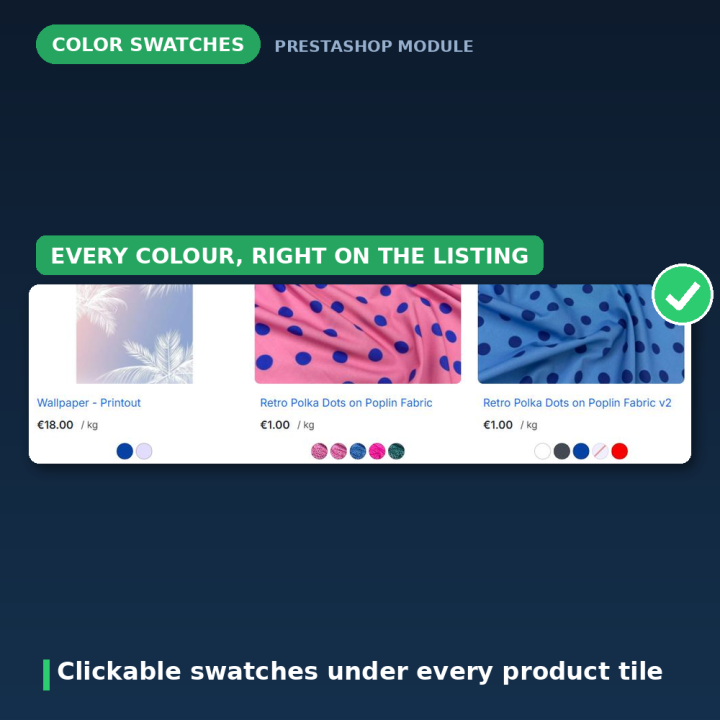
Show every available colour as a clickable swatch under each product in your listings, so shoppers see the range at a glance and jump straight to the one they want without opening each product first. Colours and texture images, square or round in four sizes, out-of-stock colours crossed out or hidden, and a "+N" badge when a product has more colours than you want to show. Works on category, search, brand, supplier, price-drop, best-seller, new-product and home page listings. No JavaScript at all. For PrestaShop 1.7 – 9.
The colour they wanted was there — they just never saw it
On a category page a shirt is one photo in one colour. The customer who wanted it in navy scrolls past, because nothing on the tile says navy exists. This module puts the whole colour range under every product, as swatches you can click — and each swatch opens the product page with that colour already selected.
How it works
- 1. Use a "Color or texture" attribute — in Catalog → Attributes & Features, set your colour attribute to that display type and give every value a colour code or a texture image.
- 2. Give your products combinations that use those values.
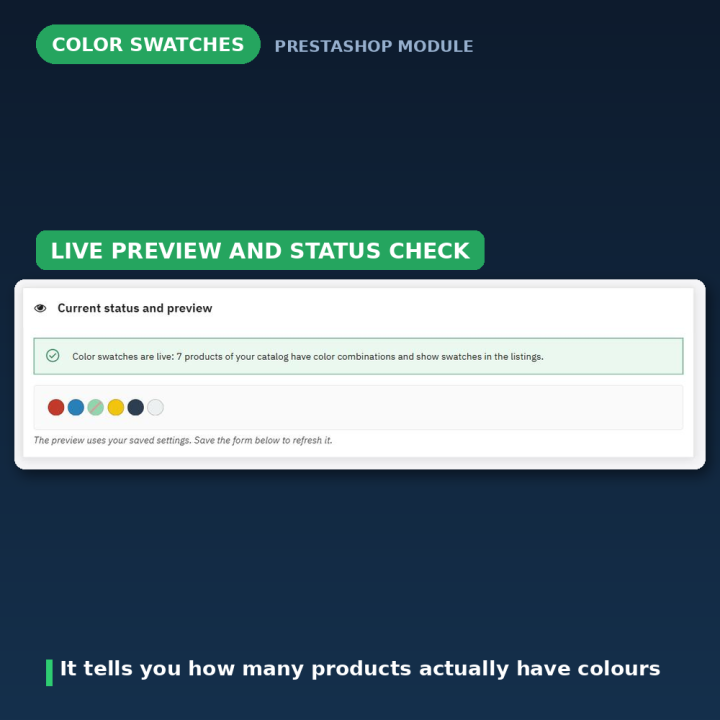
- 3. Pick shape, size and out-of-stock behaviour on the configuration page, which shows a live preview of the swatches with your saved settings.
Everywhere your products are listed
Category pages, search results, brand and supplier pages, price drops, best sellers, new products, and the product sections of the home page — featured products, new arrivals and the rest. Any theme built on the standard product miniature works out of the box. For custom sliders and templates that do not use it, one Smarty line puts the swatches anywhere a product variable exists: {widget name='colorsonproductlist' product=$product}.
Colours that ran out, handled your way
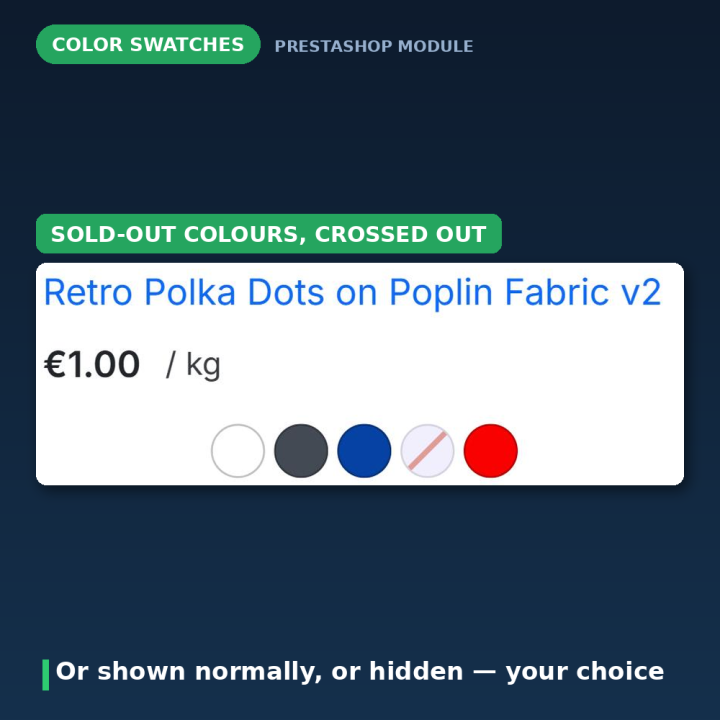
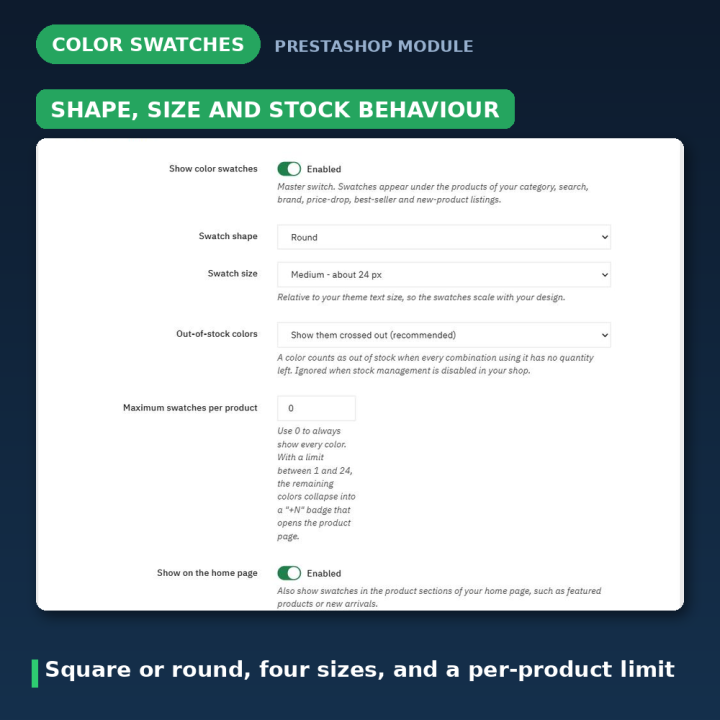
A colour counts as out of stock when every combination using it has zero quantity left. You choose what happens then: show it crossed out so shoppers can see the colour existed, show it like any other colour, or hide it completely. Either way the swatch link always prefers an in-stock combination, so a click never lands on something unbuyable when an alternative exists.
Colours, textures and tidy lists
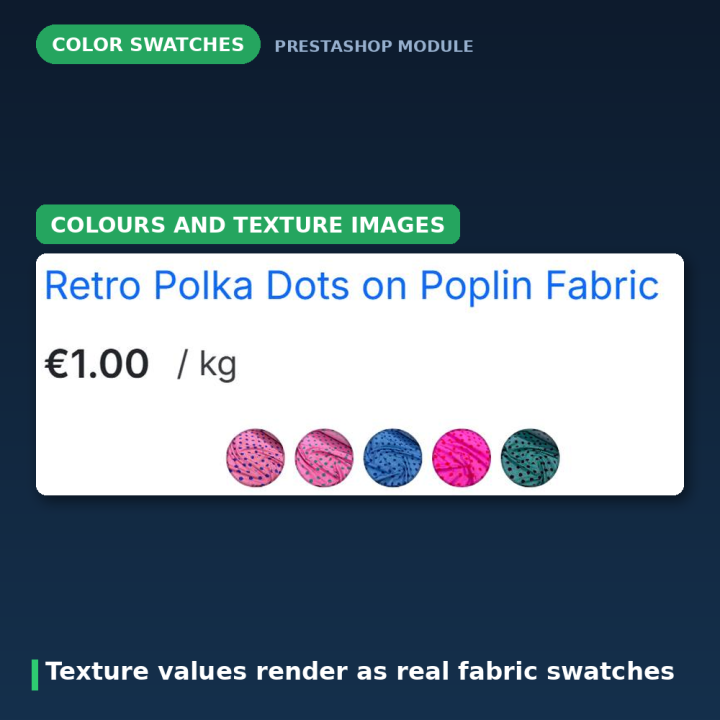
Plain colour codes and texture images are both rendered, and when a value has both the texture wins — exactly as it does on the product page. If a product comes in twenty colours and you do not want twenty swatches on a tile, cap the number: the rest collapse into a "+N" badge that opens the product page.
Square or round, four sizes — and the product page can match
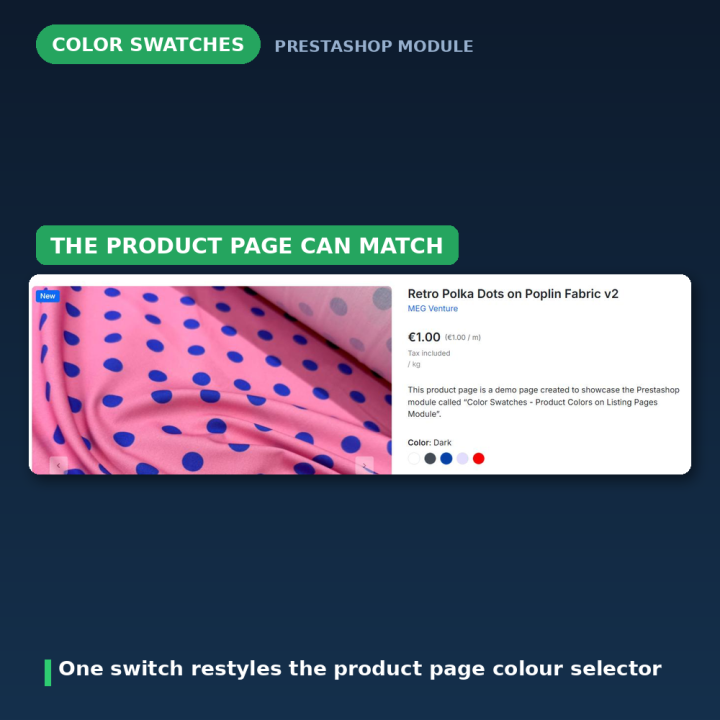
Swatches can be square or round, in four sizes from roughly 8 to 32 px, scaling with your theme's text size. One switch also restyles the product page's own colour selector with the same shape and size, so the listing and the product page stop looking like two different shops.
Light by design
No JavaScript at all. One small stylesheet, one style tag in the head, one database query per product. No core overrides, no template edits, nothing added to your theme's build.
What version 2.0 fixed
The 1.x releases had three real defects, all gone. The "Display not available colors" switch did nothing on PrestaShop 1.7, because the core function it relied on ignores that parameter and follows the shop-wide "Display unavailable attributes" preference instead; the module now runs its own stock-aware query, so the setting genuinely decides — including the new crossed-out mode. "Auto-hide excess colors" never hid anything, because no script ever filled the counter element; it is replaced by a server-side swatch limit with a real "+N" badge. And the same style and script block was repeated under every single product on a page; 2.0 ships one static stylesheet instead. Settings that used generic names other modules could overwrite are migrated to prefixed names automatically.
Compatibility
PrestaShop 1.7, 8 and 9. The module renders through the standard displayProductListReviews hook on the product miniature and hides your theme's own hover-only variant links while it is active, so colours are not shown twice. Uninstalling removes the settings, brings those variant links back and returns the product page selector to your theme's default styling.
Frequently asked questions
Do the swatches actually do anything, or are they just a preview?
They are links. Clicking one opens the product page with that colour already selected, and it prefers an in-stock combination.
Will it work with my theme?
Any theme based on the standard product miniature works with no changes. For custom sliders or templates that do not use it, add {widget name='colorsonproductlist' product=$product} where you want the swatches.
What happens to colours that are sold out?
Your choice: crossed out (recommended, because shoppers still learn the colour exists), shown normally, or hidden entirely.
Can I stop twenty swatches appearing on one tile?
Yes. Set a maximum per product between 1 and 24 and the remaining colours collapse into a "+N" badge; 0 shows them all.
Does it show texture images as well as flat colours?
Yes. Both are rendered, and when an attribute value has a colour code and a texture, the texture is used — the same rule the product page follows.
Will it slow my category pages down?
It ships no JavaScript, one stylesheet and a single query per product, so the cost is one small query and a few spans per tile.
Why don't swatches show on my home page?
Turn on "Show on the home page". If they still do not appear, that home page module uses its own markup rather than the standard miniature — add the widget snippet to its template.
-
Brand

-
Reference4792
-
EAN131691246247926
-
CompatibilityPrestashop 1.5
Prestashop 1.6
Prestashop 1.7
Prestashop 8
Prestashop 9 -
Available Module TranslationsDutch
English
French
German
Italian
Polish
Portuguese
Spanish
Turkish
Compatibility
PS1.7
PS8
PS9
Translations
 Dutch
Dutch
 English
 French
 German
 Italian
 Polish
 Spanish
 Turkish
Developer
 MEG Venture
4 other products in the same category
Brands Showcase - Elegant Brand and Manufacturer Directory
€49.99
Rated out of 5 stars based on
review(s)
Smart Scroll Buttons - Back to Top & Scroll to Bottom
€39.99
Rated out of 5 stars based on
review(s)
Product Redirect Button - Where to Buy & External Links
€49.99
Rated out of 5 stars based on
review(s)
| Version | 2.0.2 |
|---|---|
| Last updated | 2026-07-28 |
| Changelog | - [2026-07-24] Add Italian, Dutch, Polish, and Turkish translations for color sample module - [2026-07-23] Bump version to 2.0.2 and update changelog for improved upgrade stability - [2026-07-23] Translate color swatches module strings to Polish and Turkish for improved localization. - [2026-07-23] Populate translation files with complete translatable strings - [2026-07-23] Populate translation files with complete translatable strings - [2026-07-23] Populate translation files with complete translatable strings - [2026-07-23] Populate translation files with complete translatable strings - [2026-07-23] Add missing translation files (fr, de, pl, nl, tr, it, es) - [2026-07-22] Hide duplicated native color swatches on Bootstrap 5 / Hummingbird themes (2.0.1) - [2026-07-15] feat: Add initial module files and upgrade script for Colors on Product List - [2026-06-21] Refactor license information and update array syntax for consistency - [2023-09-05] v1.2.0 - [2022-10-18] v1.0.0 - [2022-09-25] v1.0.0 - [2022-09-25] Initial commit |
↻ Version history (2)
• [2026-07-15] feat: Add initial module files and upgrade script for Colors on Product List
• [2026-06-21] Refactor license information and update array syntax for consistency
• [2023-09-05] v1.2.0
• [2022-10-18] v1.0.0
• [2022-09-25] v1.0.0
• [2022-09-25] Initial commit
• [2026-06-21] Refactor license information and update array syntax for consistency
• [2023-09-05] v1.2.0
• [2022-10-18] v1.0.0
• [2022-09-25] v1.0.0
• [2022-09-25] Initial commit
Comments (0)
Your review appreciation cannot be sent
Report comment
Report sent
Your report cannot be sent