
Distance Sales Contracts - Auto-Filled CMS Pages, Checkout Terms & PDF by Email images
Distance Sales Contracts - Auto-Filled CMS Pages, Checkout Terms & PDF by Email
Price:
€49.99
No tax
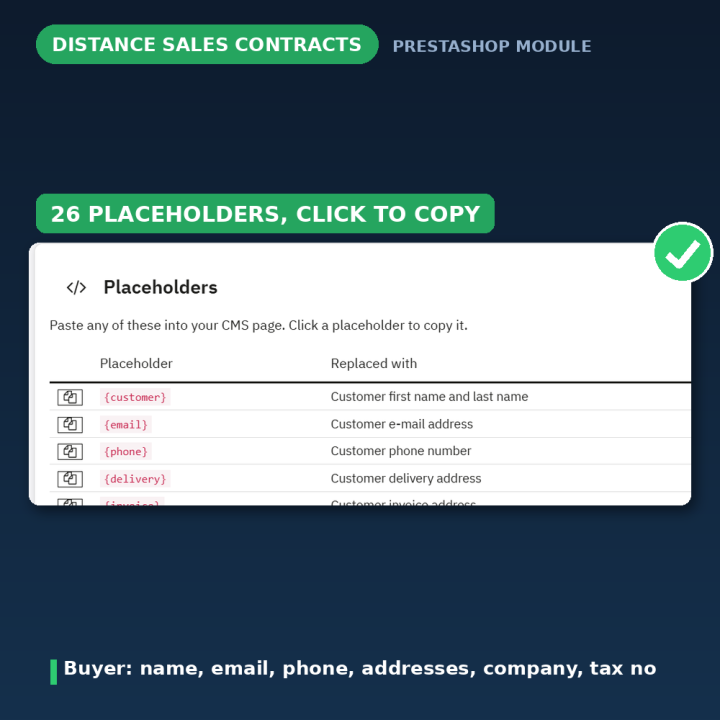
Turn any CMS page into a living document. Drop placeholders like {customer}, {cartproducts} or {shopaddress} into your Distance Sales Contract and the module fills them with real customer, order and shop data everywhere the page appears — as the terms customers approve at checkout, on their order page with a print / save-as-PDF button, and as a PDF attached to the order confirmation email. 26 placeholders, a one-click contract generator and a status panel that checks your setup. For PrestaShop 1.7 – 9.
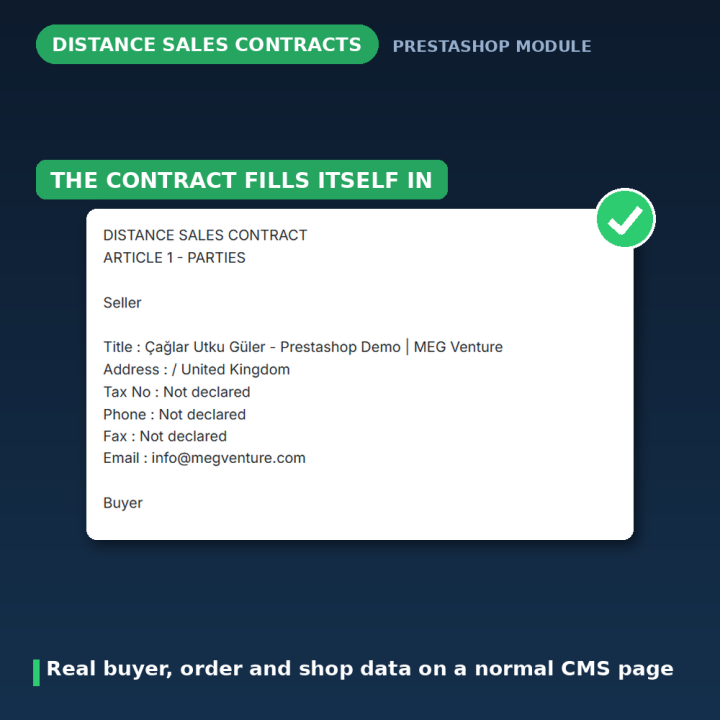
A contract that fills itself in
A Distance Sales Contract has to name the actual buyer, the actual products and the actual totals — which is exactly what a static CMS page cannot do. This module makes the page dynamic: you write it once, drop in placeholders, and every customer sees their own version. Required by law in Turkey (Mesafeli Satış Sözleşmesi) and comparable across the EU, it works just as well for any legal or informational page that needs real data in it.
How it works
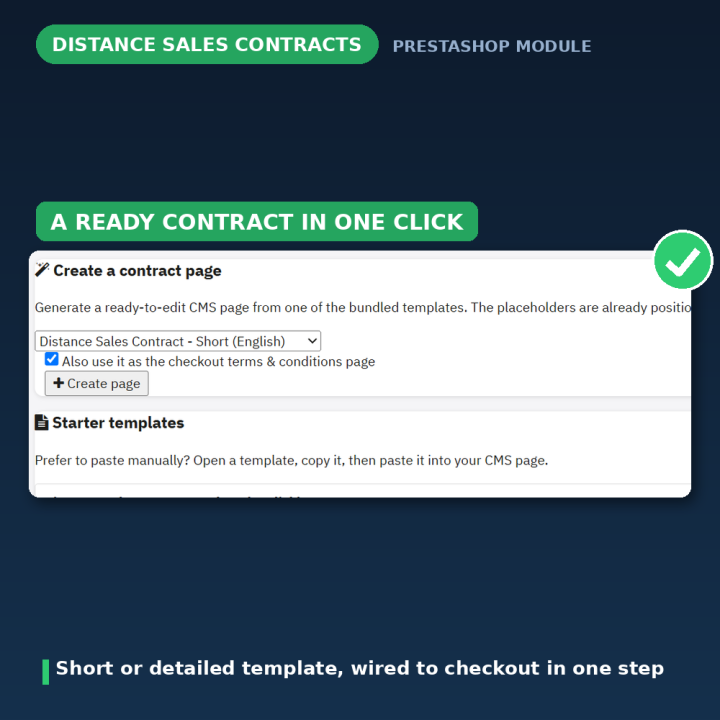
- 1. Create the page in one click — the configuration page generates a ready-to-edit contract from a bundled template (English or Turkish, short or detailed) with the placeholders already in place, and can wire it to checkout as your terms and conditions in the same step.
- 2. Edit the wording — it is a normal CMS page under Design → Pages, so you adjust the text to your business in every language you sell in.
- 3. It gets personalised everywhere — at checkout with the customer's current cart, on the order page with the finalised order, and as a PDF attached to the order confirmation email.
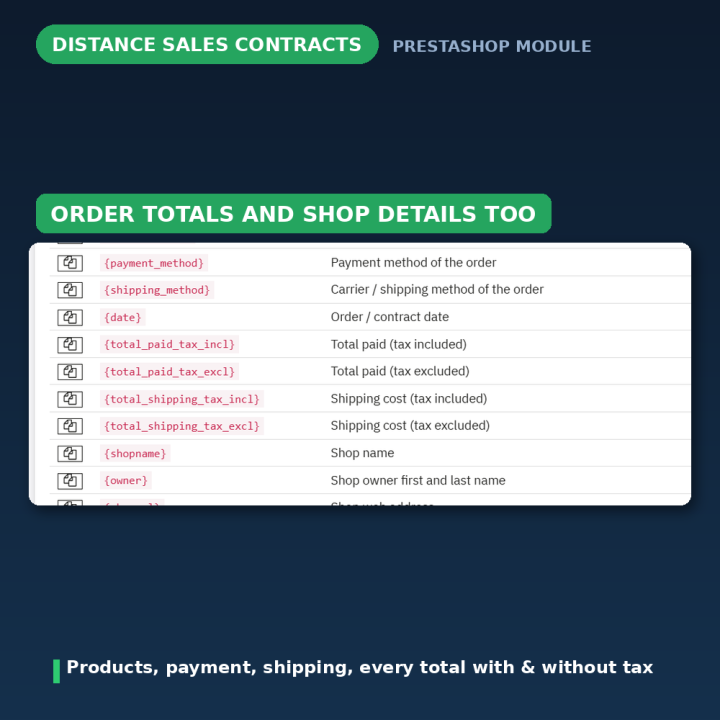
26 placeholders, three groups
Buyer — name, email, phone, delivery and invoice addresses, company and tax number. Order — the full product table, payment method, shipping method, date and every total with and without tax. Shop — name, owner, URL, full address, tax number, phone, fax and email. At checkout the order does not exist yet, so order-only fields show a clear "Not selected yet" label while totals reflect the live cart; on the order page and in the email everything is the finalised order.
Customers can keep a copy
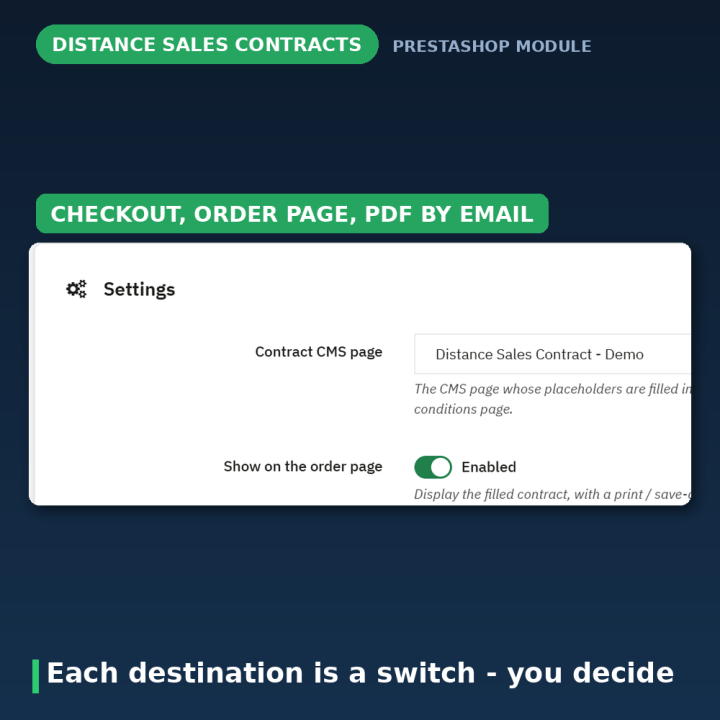
With the order-page option on, the customer sees their finished contract on their order detail page with a print / save-as-PDF button. With the email option on, the same contract is generated as a PDF and attached to the order confirmation — so a copy lands in their inbox without you doing anything.
It checks your setup for you
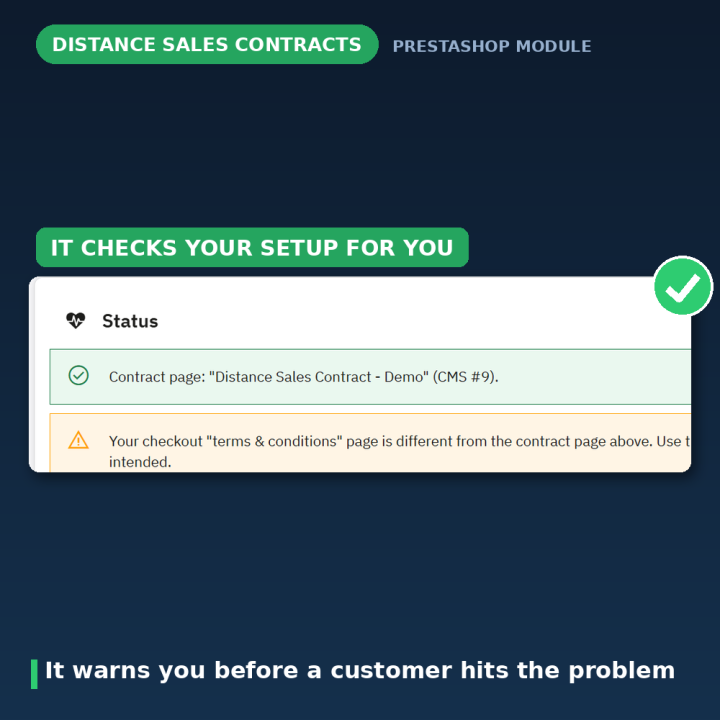
The Status panel on the configuration page catches the mistakes that would otherwise surface as a customer complaint: no contract page selected, a page with no placeholders in it, terms of service switched off in Order Settings, or a server missing the PDF library. Everything green means every order gets its contract.
Details worth knowing
- No page duplication — one page serves every order in every language.
- Clean HTML output — version 2.0.1 generates proper markup, so the product table renders correctly in the emailed PDF.
- Graceful gaps — fields the customer or shop never provided (tax number, company, fax) show a "Not declared" label instead of a blank.
Compatibility
PrestaShop 1.7, 8 and 9. The contract is an ordinary CMS page, so it inherits your theme; the checkout integration uses PrestaShop's own terms-and-conditions setting rather than a template override.
Frequently asked questions
Do I have to write the contract myself?
No — the module generates one from a bundled template (English or Turkish, short or detailed) with placeholders already in place. You edit the wording to match your business.
Where does the customer see it?
As the terms they approve at checkout, on their order detail page with a print / save-as-PDF button, and as a PDF attached to the order confirmation email — each option can be switched on or off.
What appears at checkout, when there is no order yet?
The buyer and shop details plus the live cart and its totals. Order-only values such as payment method, shipping method and order date show a "Not selected yet" label until the order exists.
Can I use it for pages other than the sales contract?
Yes. Any CMS page can hold placeholders — it is just as useful for other legal or informational pages that need real customer or shop data.
Does it work in all my shop languages?
Yes. The contract is a normal multi-language CMS page, so each language tab holds its own wording and all of them get the same placeholder substitution.
What if my server has no PDF library?
The Status panel tells you before it becomes a problem. Switch the email attachment option off, or have TCPDF installed — everything else keeps working.
-
Brand

-
ReferenceMESAFELISATISSOZLESME
-
CompatibilityPrestashop 1.5
Prestashop 1.6
Prestashop 1.7
Prestashop 8
Prestashop 9 -
Available Module TranslationsDutch
English
French
German
Italian
Polish
Portuguese
Spanish
Turkish
Compatibility
PS1.7
PS8
PS9
Translations
 Dutch
Dutch
 English
 French
 German
 Italian
 Polish
 Spanish
 Turkish
Developer
 MEG Venture
4 other products in the same category
Smart Scroll Buttons - Back to Top & Scroll to Bottom
€39.99
Rated out of 5 stars based on
review(s)
| Version | 2.0.1 |
|---|---|
| Last updated | 2026-07-28 |
| Changelog | - [2026-07-24] Add Polish and Turkish translations for custom CMS content module placeholders and messages - [2026-07-23] Translate CMS content module strings from English to Turkish for improved localization and user experience. - [2026-07-23] Populate translation files with complete translatable strings - [2026-07-23] Populate translation files with complete translatable strings - [2026-07-23] Populate translation files with complete translatable strings - [2026-07-23] Add translation files for FR, DE, PL, NL, TR, IT, ES (7 languages) - [2026-07-23] Populate translation files with complete translatable strings - [2026-07-23] Populate translation files with complete translatable strings - [2026-07-23] Populate translation files with complete translatable strings - [2026-07-22] fix: correct display name formatting in Customcmscontent module - [2026-07-15] fix: update README and translations to clarify PDF output issues with tags - [2026-07-15] feat: update version to 2.0.1 and enhance PDF output handling - [2026-07-15] feat: add upgrade scripts and templates for custom CMS content module - [2026-06-21] Refactor license information and update placeholder replacement logic in PlaceholderReplacer class - [2025-01-09] UPDATE - [2024-08-14] Initial release - [2024-06-15] Initial commit |
↻ Version history (2)
• [2026-07-15] fix: update README and translations to clarify PDF output issues with tags
• [2026-07-15] feat: update version to 2.0.1 and enhance PDF output handling
• [2026-07-15] feat: add upgrade scripts and templates for custom CMS content module
• [2026-06-21] Refactor license information and update placeholder replacement logic in PlaceholderReplacer class
• [2025-01-09] UPDATE
• [2024-08-14] Initial release
• [2024-06-15] Initial commit
• [2026-07-15] feat: update version to 2.0.1 and enhance PDF output handling
• [2026-07-15] feat: add upgrade scripts and templates for custom CMS content module
• [2026-06-21] Refactor license information and update placeholder replacement logic in PlaceholderReplacer class
• [2025-01-09] UPDATE
• [2024-08-14] Initial release
• [2024-06-15] Initial commit
Comments (2)
Your review appreciation cannot be sent
Report comment
Report sent
Your report cannot be sent