Your customers find your broken pages before you do
Every catalogue drifts. A supplier link dies, a price is left over from last season, a description loses the one detail buyers actually need. The people who notice are your visitors — and unless you give them a way to say so, they simply leave.
This module puts a discreet Report an issue button on every product page. One click opens a dialog, the visitor says what is wrong in a sentence, and the report lands in your back office.
Four issue types and a sentence
The visitor picks from broken link, wrong price, missing information and other — you choose which of the four to offer — and writes a short description, between 10 and 1000 characters, with a live counter as they type.
Name and e-mail are optional and shown only to guests; signed-in customers are identified from their account. The e-mail address exists for exactly one purpose: telling the reporter you fixed it.
Stored first, e-mailed second — and that is the whole point
The report is written to your database before any mail is attempted. If your mail server is having a bad day, the report is still in your list. The failure is written to your logs rather than shown to the visitor as an error.
This ordering is the reason version 4 exists. See below.
A back office that is an actual workflow
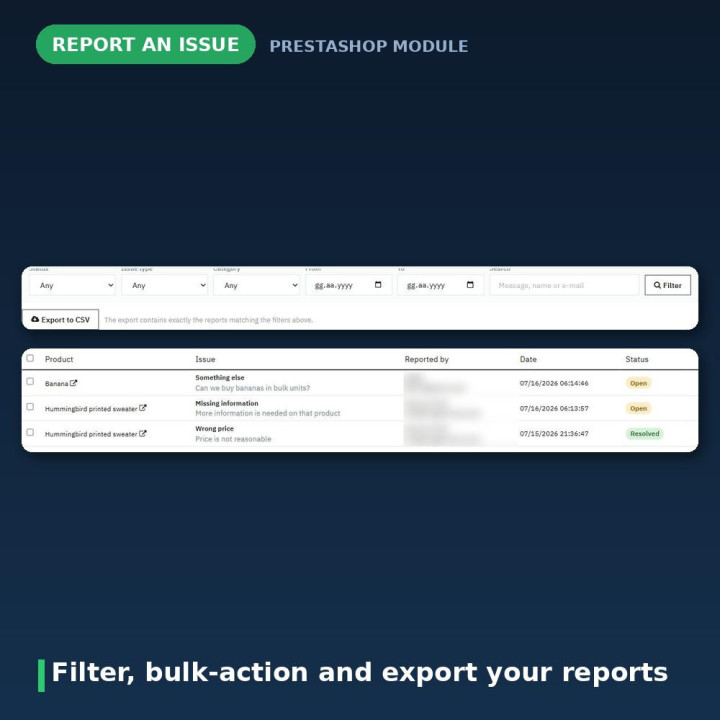
Reports arrive in a list you can work through. Filter by status, issue type, category, date range and free text across message, name and e-mail. Select several and mark in progress, mark resolved, mark as spam or delete in one action.
Each row expands to show the full message, the product — with links to both its front-office page and its editor — the reporter, timestamps, a status selector, and a notes field for your reply. Reports move through open, in progress, resolved, duplicate and spam.
Export to CSV gives you exactly what your filters currently match, not the whole table.
Numbers that tell you where the problems are
An At a glance panel counts what is waiting, what arrived this week and this month, what you have resolved, and what was spam — each figure clickable straight into a filtered list. Beside it sits your five most-reported products, which is usually the fastest route to the page that actually needs fixing.
A widget on the Dashboard home shows the number of reports waiting, and hides itself entirely when there are none.
Tell the reporter you fixed it
When you set a report to Resolved, one tick box e-mails the person who raised it. It only ever sends if they left an address, and your note goes into the message. It costs nothing and it is the part customers remember.
Spam protection that does not punish real people
A honeypot field, a minimum fill time and an HMAC-signed, time-limited token are always on and need no configuration. The token lasts two hours and is bound to the product, so it cannot be replayed across your catalogue.
Beyond that: a per-visitor, per-product hourly limit (default 1, set 0 to disable) with a fixed global cap of 10 reports per hour per visitor on top. Deduplication files the same person reporting the same issue on the same product within 24 hours as a Duplicate rather than alerting you twice — they are all still in the list.
Optional reCAPTCHA v3 is available and off by default. It loads a Google script on your product pages, so mention it in your privacy policy if you switch it on.
The reporter's IP address is never stored
Rate limiting has to recognise a repeat visitor, so the module stores hash_hmac('sha256', $ip, _COOKIE_KEY_) — a hash keyed with your shop's own secret — and never the address itself.
The keying matters. An unkeyed SHA-256 of an IP address can be reversed in minutes by hashing all four billion IPv4 addresses; keyed with a secret only your shop holds, it cannot. The module's own test suite asserts this explicitly.
Reports are deleted when their product is deleted, and all of them when you uninstall. If the official psgdpr module is installed and enabled, its consent block is rendered in the form automatically.
Version 4 fixed a module that had not delivered a report since 3.1.0
This is worth stating plainly, because it is the real reason to upgrade.
When the submission endpoint moved into controllers/front/ in 3.1.0, the mail template path beside it was not updated, so it resolved to a directory that does not exist. Mail::Send() returned false, the module answered die('0') — and because 0 is valid JSON, the front end parsed it and ran the success handler.
Every shop on 3.1.0 through 3.2.2 was discarding customer reports while thanking the reporter for them. Four released versions, and nothing was stored, so there was nothing to recover. Mail paths now resolve from _PS_MODULE_DIR_, and storage happens before mail.
It also closed an open mail relay
Version 3.x read the notification recipient from a hidden field in the page. It was never validated and never compared against the shop's own address, then handed straight to Mail::Send().
Any anonymous visitor could make your shop send mail to any address they chose, with unescaped HTML in the body, as often as they liked. Pointed at your sending reputation. The recipient now comes from module configuration and nowhere else.
The secure_key that was supposed to prevent this was md5(_COOKIE_KEY_ . 'reportbrokenlink') — constant for the shop's lifetime and printed into every product page. Read once, replayable forever. It is now an HMAC-signed, time-limited, product-bound token.
Visitor input is also escaped on the way out, not just stripped on the way in. PrestaShop substitutes mail variables with a plain str_replace and escapes nothing, so an unescaped string would let a reporter put a phishing link into an e-mail that genuinely comes from your shop.
The front end lost jQuery 1.8.2 and every other dependency
Version 3.x loaded jQuery 1.8.2 from Google's CDN on every product page. That sent every visitor's IP to Google before any consent, shipped a 2012 library carrying four published advisories, and overwrote your theme's own jQuery for everything that ran afterwards.
All of it is gone. The front end is dependency-free vanilla JavaScript and CSS — one small file each, registered only on product pages. No jQuery, no Bootstrap.
Submissions are now POST. Version 3.x sent them as GET — a post: "POST" option that jQuery does not have, so it silently used the default — which put every reporter's e-mail address into your web server access logs.
Accessible because it was built that way
The dialog is a real dialog: focus moves into it, Tab is trapped inside, Escape closes it, and focus returns to the button you came from. Errors are announced to screen readers, focus rings are visible, prefers-reduced-motion is respected, and it goes full screen below 480 px.
It is also moved to <body> on open. Rendered in place it sat inside the theme's add-to-cart <form> — a nested form that broke layout and could submit the wrong thing.
Compatibility
PrestaShop 1.7 through 9, PHP 7.2 to 8.3, in eight languages: Dutch, English, French, German, Italian, Polish, Spanish and Turkish.
No overrides, no core or theme modification, no jQuery. Five hooks, one database table. Uninstalling removes the table, every stored report and all settings — so export to CSV first if you want to keep them.
Frequently asked questions
Do my customers need an account to report something?
No, and leaving guest reports on is recommended — guests are usually the people who notice a broken page. You can restrict the button to signed-in customers with one setting if you prefer.
Where does the button appear?
On product pages, either beside the product information or below it — displayProductAdditionalInfo or displayFooterProduct. If your theme hides one, switch to the other in the module's settings.
What happens if my mail server fails?
Nothing is lost. The report is stored before any mail is attempted, the failure goes to Advanced Parameters → Logs, and the report is waiting in your list. This is the single biggest difference from version 3.
Are reporters' IP addresses stored?
No. Rate limiting uses a SHA-256 hash keyed with your shop's own secret, never the address itself. Name and e-mail are optional and collected only so you can tell the reporter you fixed the problem.
A visitor says the form told them it expired.
The signed token lasts two hours, so someone who left a product page open longer will see this. Reloading the page fixes it. Tokens are bound to the product, which is what stops them being replayed elsewhere in your catalogue.
Why are some reports marked Duplicate and not e-mailed to me?
Deduplication is on by default: the same person, same product, same issue type within 24 hours is filed as a duplicate rather than alerting you twice. They are all still in the list — filter by status Duplicate, or turn the setting off.
Can I get the reports out of PrestaShop?
Yes. Export to CSV gives you exactly what your current filters match. Cells beginning with a character a spreadsheet would treat as a formula — =, +, -, @, tab or carriage return — are neutralised on purpose, so nobody can smuggle a formula into a file you open.
Does it need jQuery or Bootstrap?
Neither. The front end is vanilla JavaScript and CSS, one small file each, loaded only on product pages. If you are debugging a click that does nothing, check your console for an unrelated script error on the page.
What happens to my reports if I uninstall?
They are deleted, along with all settings — you are asked to confirm first. Export to CSV beforehand if you might want them later.
















Comments (1)
Your review appreciation cannot be sent
Report comment
Report sent
Your report cannot be sent